Main Parameters
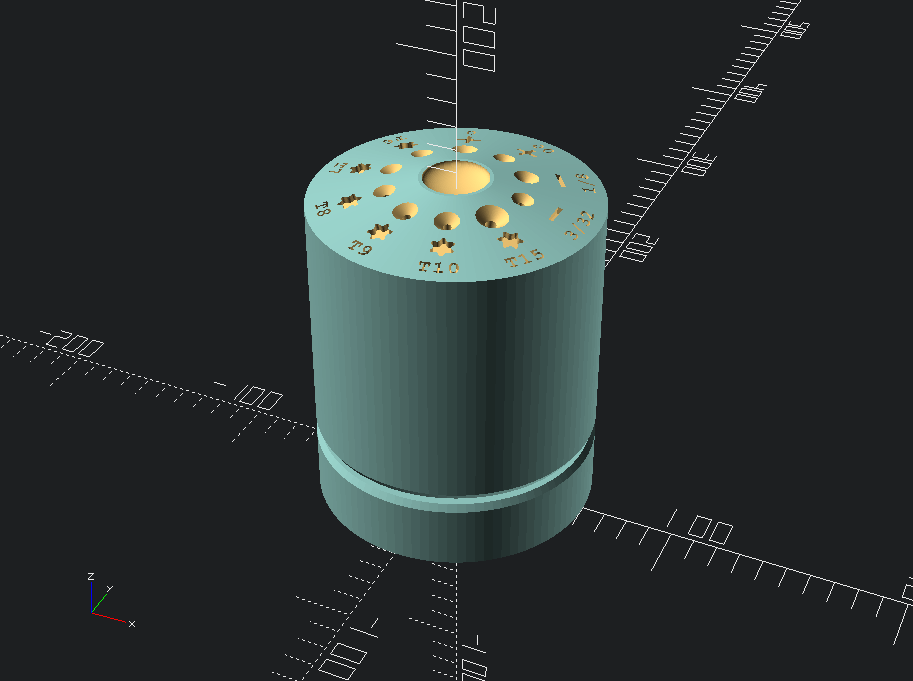
1. View: Allows for switching between different perspectives of the model, for this model you can see the complete model, just the base section, top section, the holes that will be cut into the model, labels that can be embossed/engraved into the top, and an easy to print label view.
2. Label: Changes label to either embossed or engraved.
3. Introspec: Maybe not the best descriptor for this function, setting this parameter to true will allow a function to check whether the screwdriver holes will intersect (bad!) and will throw an error if that is true.
4. Preview Resolution: Allows for quicker modelling, I usually set to 50 when modelling a circular object.
5. Render Resolution: Resolution used when the model is converted to an STL. (More is usually better! Will take longer though..)
6. Base Radius: The maximum horizontal radius for the model
7. Base Height: Height of the lower section
8. Mid Height: Height of the middle section (below the angled bit)
9. Top Radius: The horizontal radius of the smaller topmost section (Changing this value will set the angle of the top “cone”)
10. Top Height: Total height of the topmost section
11. Driver Holders: Number of screwdriver holes needed
12. Driver Depth: Depth of each screwdriver holder (This should be written in list format, for ex. [1, 2, 3, 4] if you chose to have four screwdriver holes)
13. Driver Holder Depth: Max depth of the screwdriver holes.
14. Driver Holder Radii: Radius for each holder, If all holes are the same size just type one number: [10], if there are multiple size holes, the radius of each can be denoted as [1, 2, 3] with as many values as there are holes defined above.
15. Driver Holder Vertical Placement: Placement of screwdriver holder (Lower value = lower text, higher value = higher text).
16. Text Labels: Text for each holder.
17. Text Vertical Placement: Text height adjustment (Lower value = lower text, higher value = higher text)
18. Image Labels: Image for each holder. These are setup to accept .dxf labels, there are a number of labels included in the download folder.
19. Image Vertical Placement: Label image height adjustment (Lower value = lower text, higher value = higher text).
20. Text Depth: Overall height of the text labels. (Needs to be a larger number than that of the text cutout depth)
21. Text Cutout Depth: Depth of the text labels for engraving.
22. Text Character Spacing: Spacing between characters of a single label
23. Bearing Outer Radius: Should be self-explanatory
24. Bearing Inner Radius: Also should be self-explanatory
25. Bearing Height: The height, of the bearing
26. Bearing Height Gap: Gap between the base and the top section.